Web site quick query

Scale Model Addict - Model Tips, Guides, Tools & Tech, Tutorials, and Community

Help Support Scale Model Addict:

C.A. Whitecloud

Well-Known Member
Joined
Oct 26, 2023
Messages
418
City & State/Province
Fairview, OR
What is the difference and the best way to use these two options? Reply I get, but I'm not sure how to use quote. And how does one add a link to another thread? Say I wanted to put a link to my work in progress of this Cadillac kit (in new stash thread) I bought years ago.
1781212028868.png
 
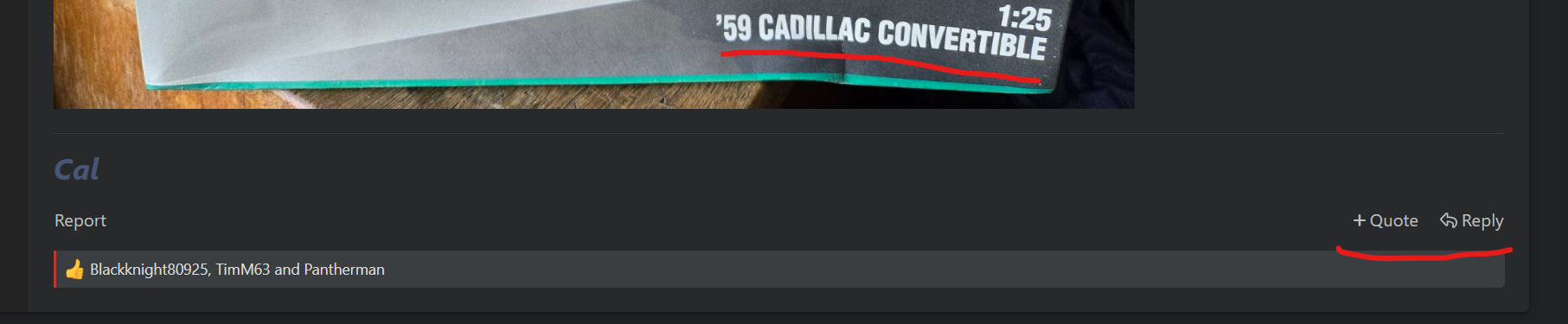
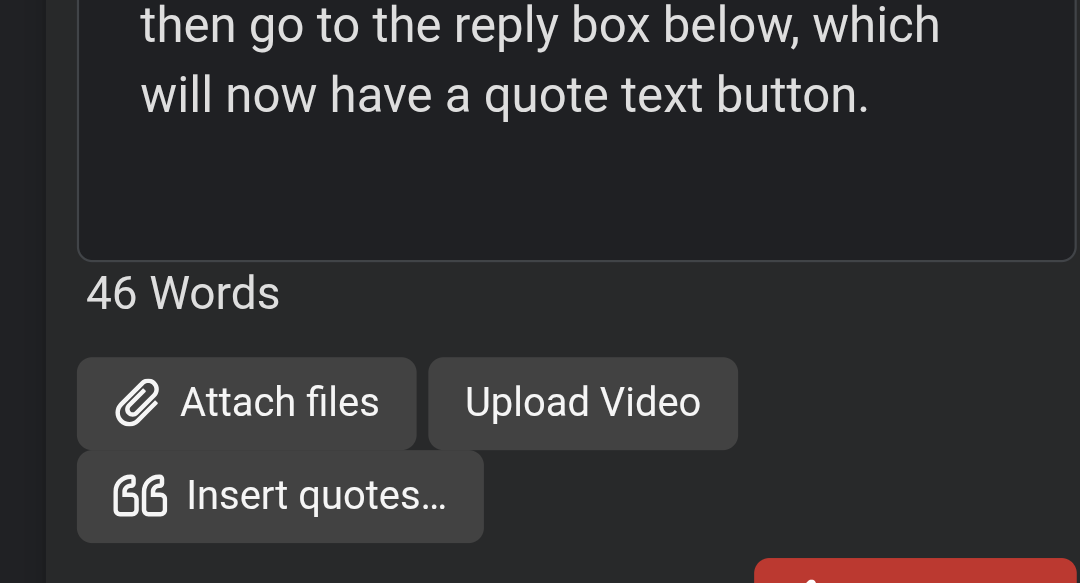
With quote, you can highlight the text you want to quote, hit quote, then select another bit of text from another post in the same thread, and again if you want, then go to the reply box below, which will now have an 'insert quotes' button.

3037.png


If you quoted more than one bit of text, then it shows them all and allows you to reorder them before inserting.

Say I wanted to put a link to my work in progress of this Cadillac kit
There are probably a few ways to do that. If it is one of my threads, I go to the 'find threads' menu, and select the the 'my threads' item.
This will bring up a list of my threads; then I highlight the title of the thread I want to link to, and select 'copy link address'

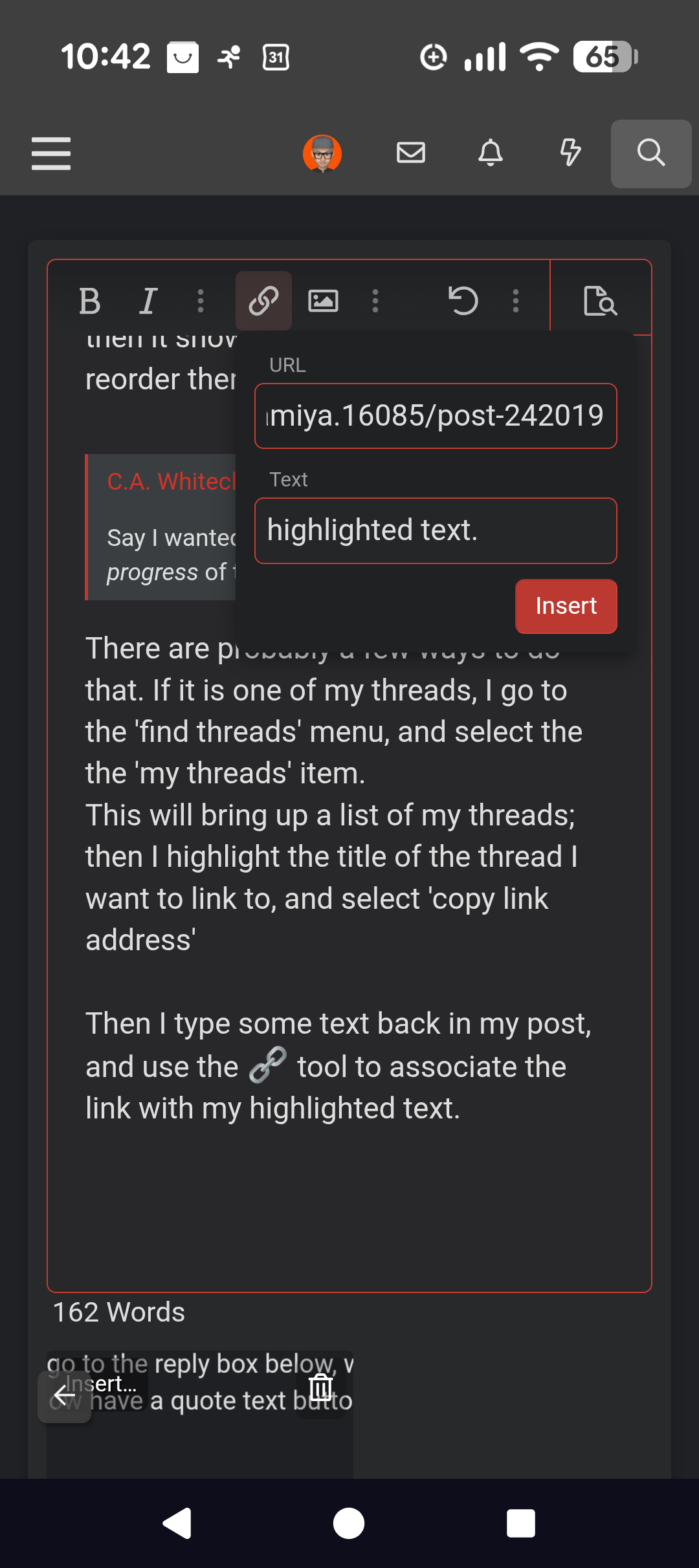
Then I type some text back in my post, highlight it and use the 🔗 tool to associate the link with my highlighted text.

3041.png

Hope my explanation isn't too confusing!

I added a link to a post of yours I found by searching on your name.
 
Last edited:
With quote, you can highlight the text you want to quote, hit quote, then select another bit of text from another post in the same thread, and again if you want, then go to the reply box below, which will now have an 'insert quotes' button.
Or whole messages, if you don't select text in them.

This works for both: if you select text in a message and then hit Reply, you will quote only the selected text, but with no text selected, you quote the whole message.

The idea behind the +Quote button is, basically, to let you read through the thread and select the sentences or messages you want to reply to, then when you get to the bottom, you can do that all at once instead of having to go back and forth between the reply field and the rest of the thread to find more things to reply to.
 
Say I want to post a WIP thread for a build previously completed. I have all the pics except for the finish. Is there a preferred method? Do I want to make it one long thread or break it up some? Should I insert thumbnails with descriptions or just plop all the pics in and walk away ;) . Similar question; is there a specific place to post 'Under Glass' photos? I'm wanting to upgrade my photography and get some feedback.
 
Do I want to make it one long thread
Though some folks like to have separate threads for WIP and completed builds, more often they are combined.
My first dozen threads were of completed builds, most of which also had in progress shots.

Even in the group builds, folks tend to post their in progress shots, as it makes for less jumping around. There have been occasions I've had a separate thread for 'extra' photos, say for a complete walk around... Or maybe a deep dive on a technique or something.

I believe there there is a 10 pic limit per post. If you have more, just post again in the same thread.
How much text you want accompanying the pics is entirely up to you. Personally, I find some commentary interesting to read, and it gives opportunities to interact on related topics.
When I worked in museum exhibitry, additional text was always seen as optional, tailored to viewers who wanted to know more. Others might just ignore it.

On the subject of thumbnails, my impression is that a lot of folks would rather have the full-size image right from the get go, it makes for a more fluid reading experience. They can always click on the image to view all the images of the post together.

So yes, there are many ways to approach posting... And in the end, all the posted images are collected in the Media section, where it is possible to create 'albums', though that option doesn't seem very popular.

Not sure what you mean by "under glass".
 
As an Amazon Associate we earn from qualifying purchases. Product prices and availability are accurate as of the date/time indicated and are subject to change.
I normally write up the things I want to explain and post the photos at full size (not thumbnails) between paragraphs where they're relevant. As mentioned, you can only include ten photos per message, but if you hit that limit then just post it and write another message in the thread (don't use the +Quote or Reply buttons under your own post, though, because it's entirely pointless to quote yourself in the very next message :) ).
 
Though some folks like to have separate threads for WIP and completed builds, more often they are combined.
My first dozen threads were of completed builds, most of which also had in progress shots.

Even in the group builds, folks tend to post their in progress shots, as it makes for less jumping around. There have been occasions I've had a separate thread for 'extra' photos, say for a complete walk around... Or maybe a deep dive on a technique or something.

I believe there there is a 10 pic limit per post. If you have more, just post again in the same thread.
How much text you want accompanying the pics is entirely up to you. Personally, I find some commentary interesting to read, and it gives opportunities to interact on related topics.
When I worked in museum exhibitry, additional text was always seen as optional, tailored to viewers who wanted to know more. Others might just ignore it.

On the subject of thumbnails, my impression is that a lot of folks would rather have the full-size image right from the get go, it makes for a more fluid reading experience. They can always click on the image to view all the images of the post together.

So yes, there are many ways to approach posting... And in the end, all the posted images are collected in the Media section, where it is possible to create 'albums', though that option doesn't seem very popular.

Not sure what you mean by "under glass".
Thanks, that is exactly what I meant and you laid it all out very well. I used to frequent a site that had a "Under Glass" thread only for complete builds, little commentary except for comments, likes and such. Most of the pics had a more polished set up as far as backgrounds and lighting. I fully agree with all your points above. Thanks for all the info and the place to share.

CA
 

Latest posts

Back
Top